Call Garreth, Cameron & Jack: 0115 647 8650

Free UK shipping on orders over £100.00 & FREE gifts on checkout

Your garage NewAdd your car and see the parts that fit
Useful Links
Your Account

Talk to us

Garreth, Cameron & Jack · Mon to Fri
Call 0115 647 8650Free advice on your build
Thanks, that’s with us. We reply the same working day.
That didn’t send. Please give us a call instead.

Useful Links

Quick Access

Want to chat?

Call Garreth, Cameron, Jack
Today On: 0115 647 8650
Click Here For Our Contact Form
Buy gift vouchers today


Free UK delivery over £100
Klarna available at checkout
Established 2003, Nottingham showroom
Call the team: 0115 647 8650

Sell your car for free with the GSM Performance garage

We have added completely free car listings to the GSM Performance garage. Save your car, upload its photos and asking price, then publish a profile that other enthusiasts can find through Customer cars.

Garreth wanted a place where customers could put their own cars in front of the people browsing our websites. Your garage now gives you that route, whether you are selling a finished project or sharing a build you are still working on. You decide when the profile becomes public.

A blue Ford Escort from an existing GSM Performance customer story
Photo from our existing Ford Escort customer story. This car is not being advertised for sale by this article.

Your car listing is completely free

There is no charge to publish your car-for-sale listing.

You can create an account, add your car to Your garage and build its profile with photos and details. When you are ready to advertise it, enter your asking price and enable customer enquiries. The public profile then shows that the car is for sale, its price and a Contact customer button.

One car profile works across GSM Performance, SportSeats4U and BigBrakes4U through the same customer account, so you can keep its details together as you use our stores.

Start with a saved car in Your garage

Open your account or sign in, go to Your garage and add your car. If it is already saved, choose Photos & car profile on its card. That is where you add the gallery and decide what visitors can see.
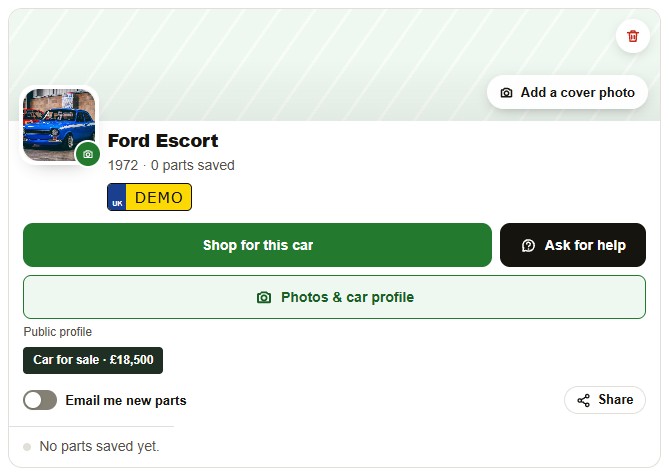
Illustrative saved car. The Photos & car profile button opens its gallery, public profile and sale settings.
Illustrative saved car. The Photos & car profile button opens its gallery, public profile and sale settings. Click the screenshot to open it at full size.

Add your asking price and publish

Tick Make this a public profile, select Car for sale, enter your asking price in pounds and allow customer enquiries. Save the profile to publish those choices. A sale listing needs all of those settings, so adding a price on its own does not publish your car.

Visitors can browse Customer cars, search by make or model and choose Cars for sale only. Opening a profile shows the owner’s chosen photos and information, with the asking price clearly displayed.
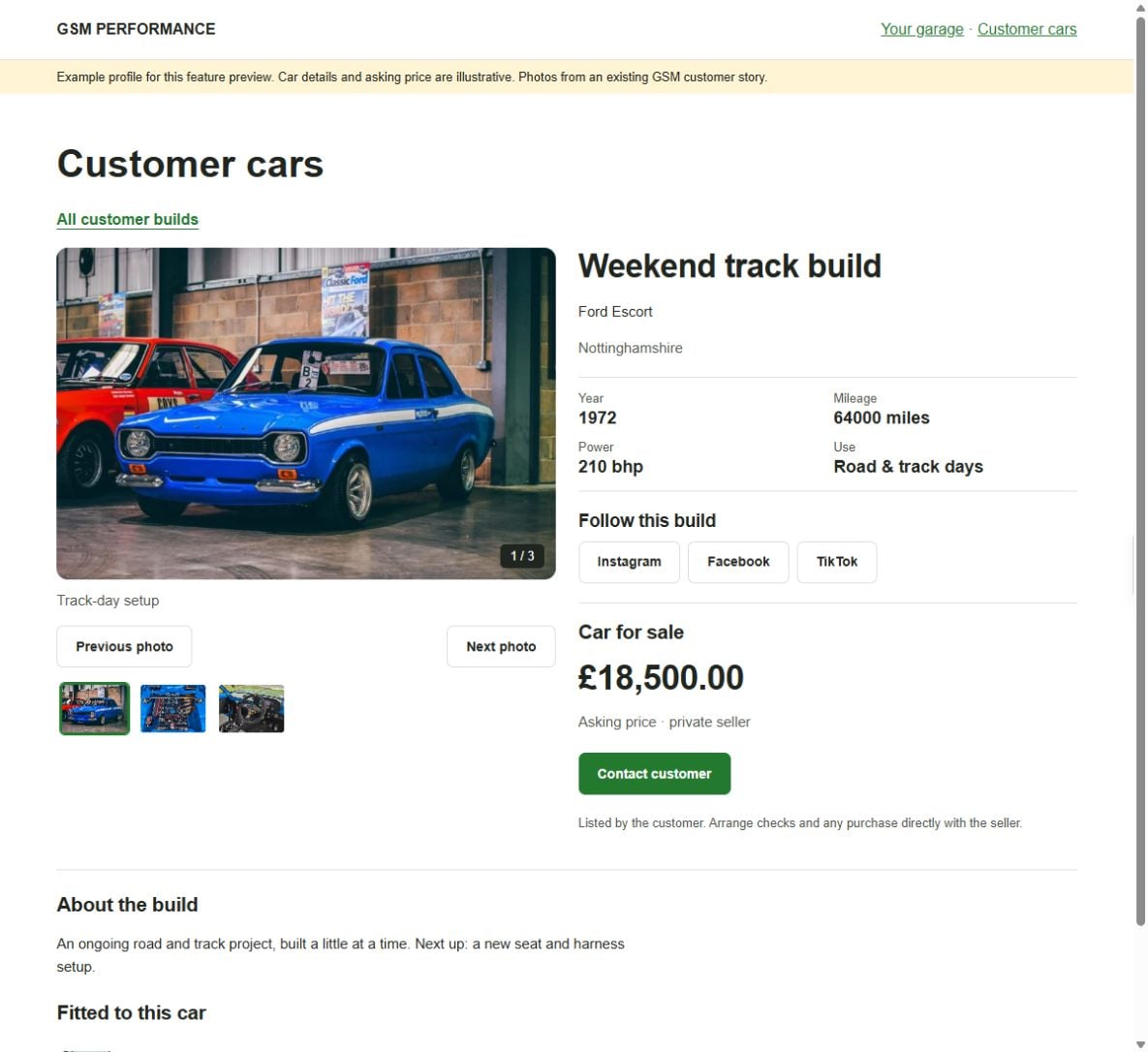
Example public sale profile. The £18,500 asking price and profile details are illustrative; this is not a customer car currently for sale.
Example public sale profile. The £18,500 asking price and profile details are illustrative; this is not a customer car currently for sale. Click the screenshot to open it at full size.

Interested customers can contact you

A signed-in visitor can use Contact customer to send an enquiry to the email address on your account.

Your email address is not displayed on the public car page. If you reply to an enquiry by email, the person you reply to will see your email address. You arrange any further conversation and sale directly with the buyer.

Choose your public details and social links

Instagram, Facebook and TikTok profile links are optional. Add the full profile URLs, then tick Show these social links on my public profile if you want visitors to follow your accounts. Leave the box unticked to keep those links off the public profile.

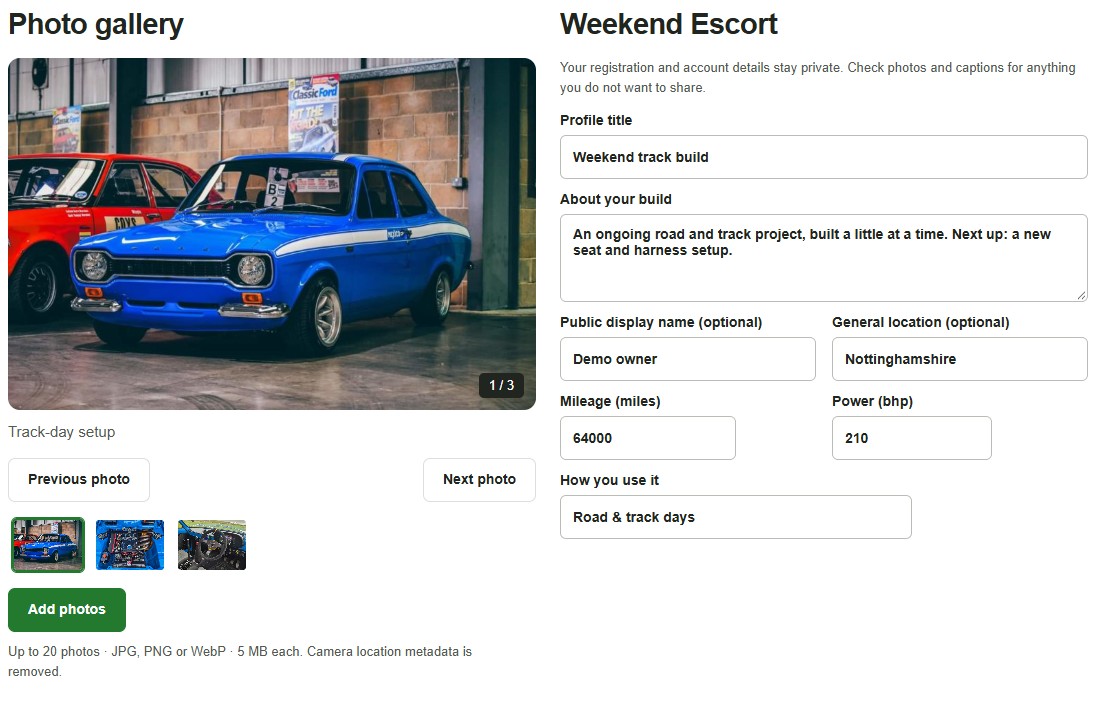
The visibility settings also let you choose extra sections such as your build story, specifications and general location. Your registration and account details are not public profile fields. Check your pictures and captions for anything you would prefer to keep private before publishing.

Optional social accounts and the public visibility checkbox in the owner editor. The URLs shown are example values.
Optional social accounts and the public visibility checkbox in the owner editor. The URLs shown are example values. Click the screenshot to open it at full size.

Put your car in front of our motoring community

Start with the free listing page or go straight to Your garage if you already have an account.

If you would like a hand with the new profile controls, drop us an email or click to open a chat. For a conversation about the plans for your car, you can also call us on 0115 647 8650.

What our customers say

Loading reviews...
Free UK Shipping

On all orders above £100

Showroom

Try before you buy, by appointment

Delivery Tracking

Updates by email and text